



How to Install IPTV Apps on Amazon Firestick!
So just bought a firestick and is wondering how to install IPTV app using downloader App, no problem by the end of this tutorial you should be able to to install IPTV apps and any unknown apps in your amazon Firestick. Once you connect your amazon firestick to your tv make sure you connect to WIFI first and go through all the necessary setups step by step. There is not much you can do with amazon fire stick when you just purchase it without sideloading apps for movies and tv shows but if you are looking to watch Live tv Channels from Canada, USA, UK, Sports and International Channels then you must purchase an IPTV subscription service and test.binge4k.com/ can help you with setting up your IPTV using downloader app and providing you the IPTV service anywhere in Canada.
Before installing any app, it’s important to enable your unknown source, so you can install apps that are outside play store. This step can not be avoided it’s a must in order to install apps. Next on your home screen search for Downloader, once it pops up, install it and open it. Last step contact test.binge4k.com/ in LIVE CHAT or via TEXT MESSEGE to give you our IPTV link for your downloader, so you will be able to install the IPTV App.
Tutorial below will guide you step by step in more details.
1. Go to the home screen of the Fire TV / Stick if you are already not there.
2. Use your remote to navigate to Find > Search on the menu bar in the middle of the screen.
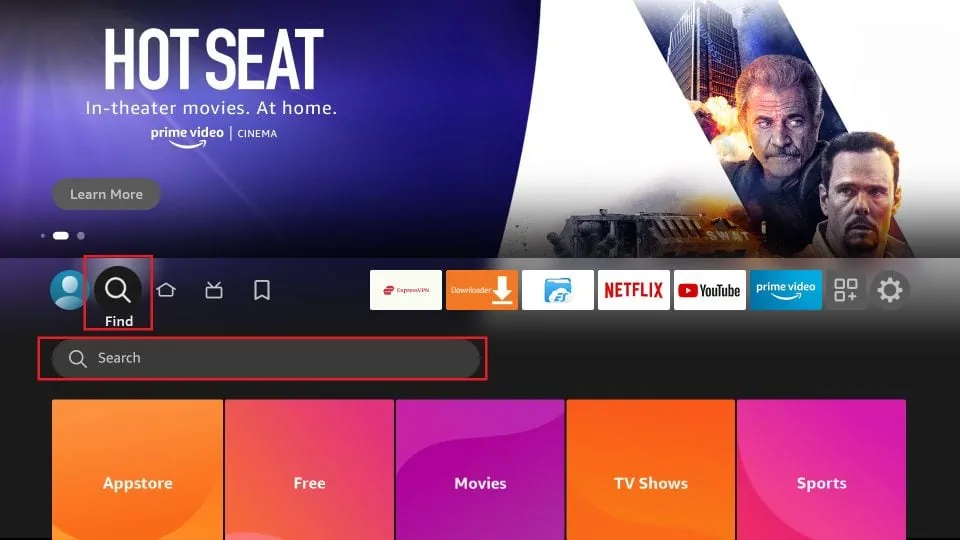
3. Now type in Downloader (without the quotes) using the onscreen keypad. You should see the app suggestions on the list as you begin typing.
When you see Downloader on the list, select and click it.
Once the app is installed, you can access it from the Your Apps & Channels section (more on it later).
1. Launch your FireStick home screen and navigate to the Settings icon.
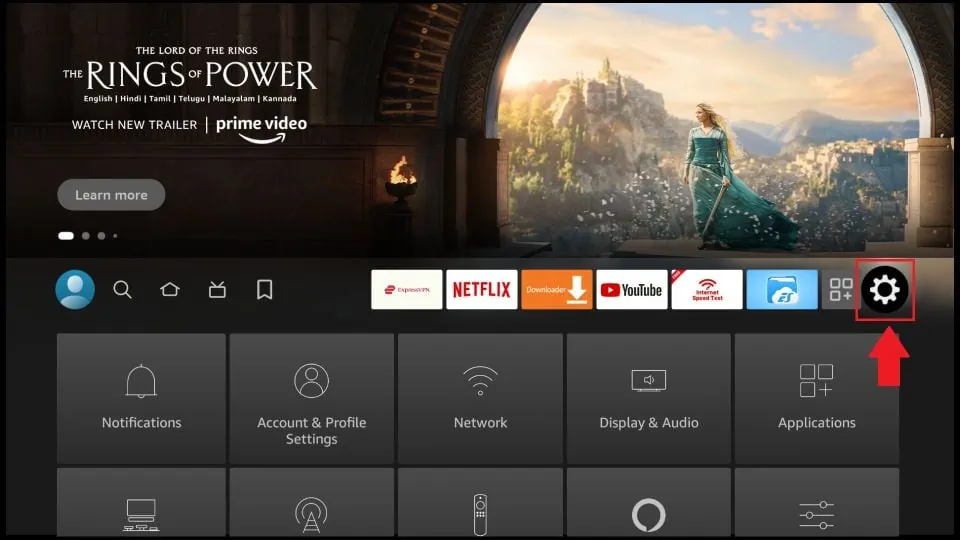
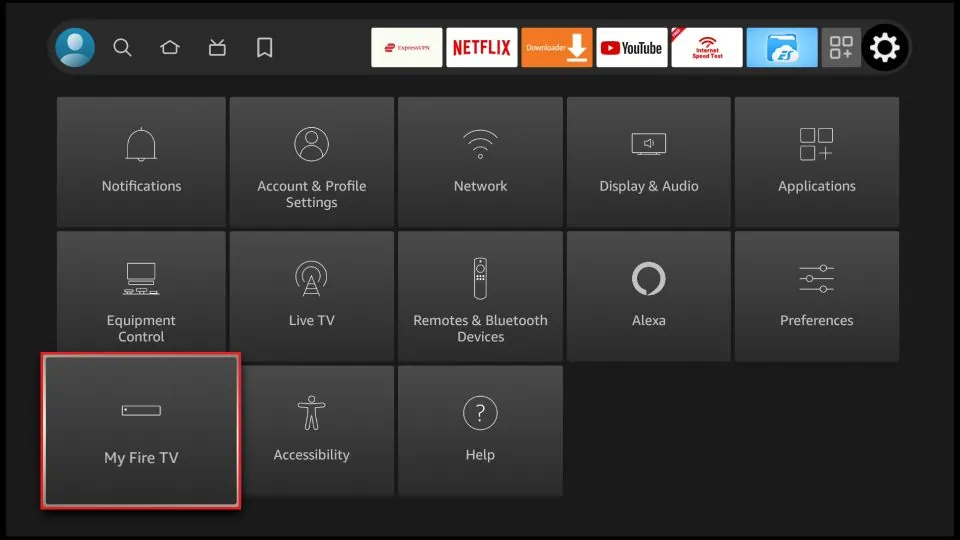
2. Scroll down to the My Fire TV tile and click on it.
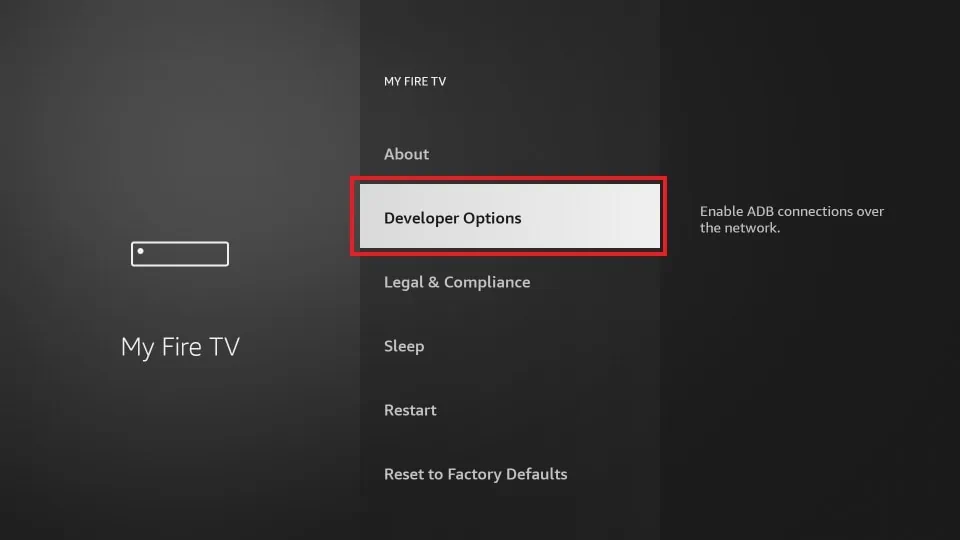
3. Click on Developer Options. ( If you do not see Developer tab here, You have to click on my fire tv or my fire tv lite or about 7 times until you see a message saying you are not a developer ), and the Developer tab should be visible for you to follow the next steps. Remember you only have to enable Developer tab once usually if you just bought a brand new firestick. If you have already enabled Developer tab then simply follow the next step.
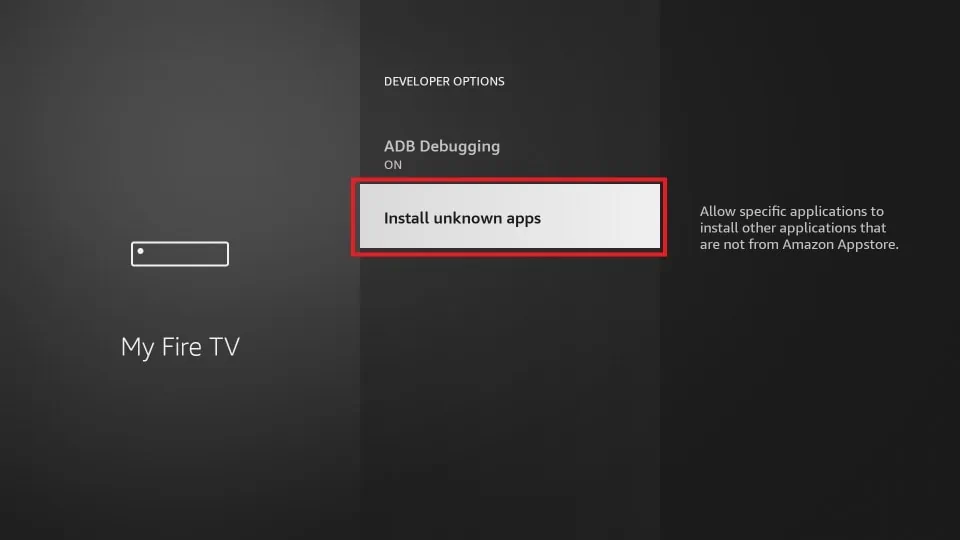
4. Select Install unknown apps.
Note: Some versions of FireStick may have the option Apps from Unknown Sources instead of Install unknown apps. In that scenario, select Apps from Unknown Sources, turn it ON and skip step 5 below.
5. Navigate to Downloader and select it to turn it ON.
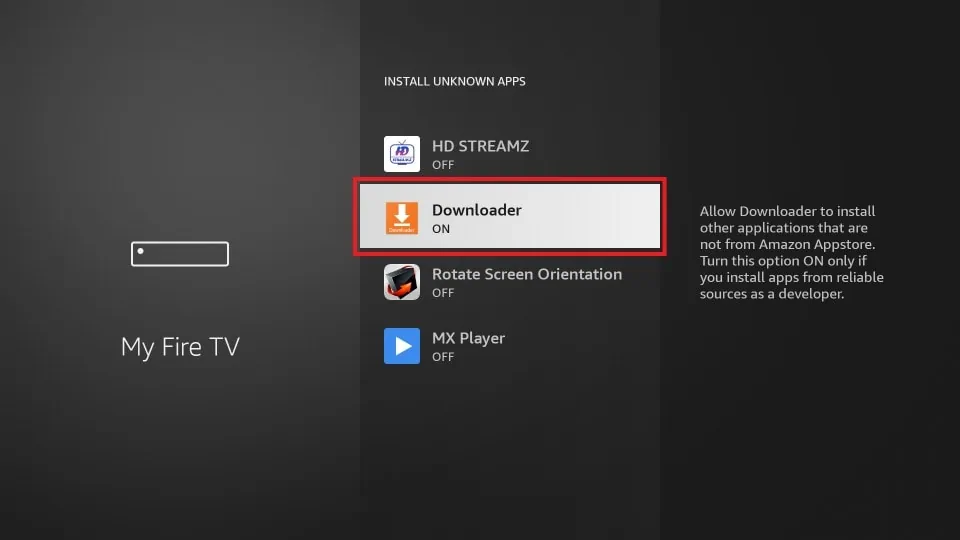
Your FireStick is now prepared to install various third-party apps using Downloader.
How to Download Apps on FireStick Using Downloader App
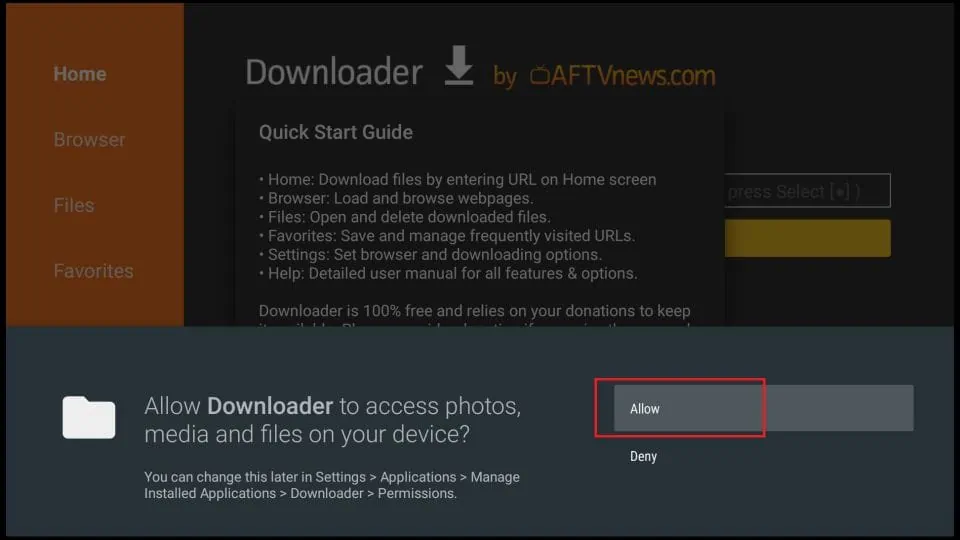
When you open the app for the first time, click Allow to grant permission.
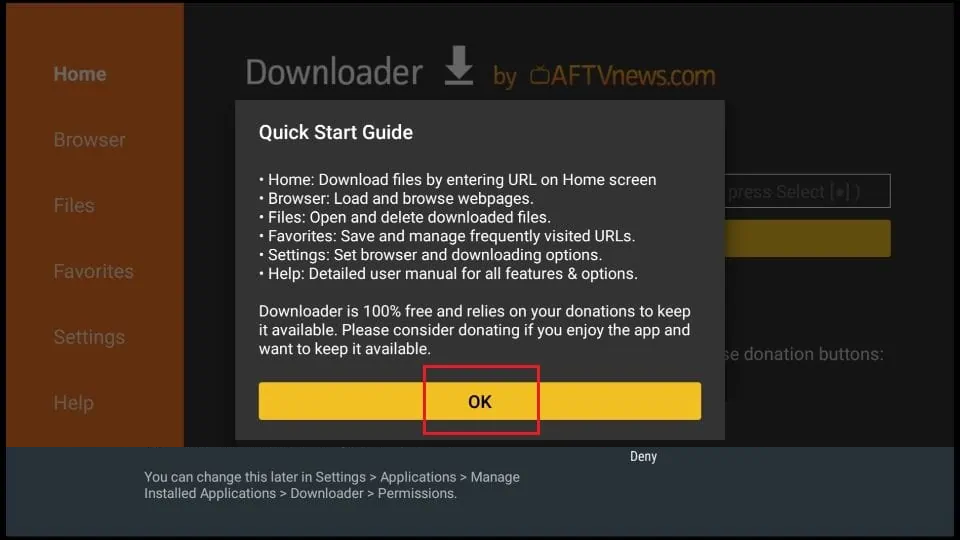
Click OK on this Quick Start Guide prompt.
Now you can ask your IPTV provider to provide you the the downloader code for the IPTV for your firestick. Once you find the downloader code, put it into your downloader app and install the app into your amazon firestick. You can also read this blog to find out more about some of the IPTV apps that work best for amazon firestick.
Tags:
Amazon Firestick IPTV best IPTV app Firestick binge4k Firestick setup Binge4k IPTV Firestick buy IPTV for Firestick Canadian IPTV Firestick Downloader app Fire TV Downloader code guide IPTV Downloader code IPTV Downloader install guide enable unknown sources Firestick Fire TV Stick IPTV Firestick apps from unknown sources Firestick Cloudflare DNS IPTV Firestick developer options Firestick Downloader app Firestick home screen setup Firestick install unknown apps Firestick internet speed IPTV Firestick IPTV 2026 Firestick IPTV 4K Firestick IPTV 4K movies Firestick IPTV account sharing issue Firestick IPTV activation Firestick IPTV advanced settings Firestick IPTV advanced users guide Firestick IPTV Android apps Firestick IPTV anti block Firestick IPTV app download Firestick IPTV Apple TV alternative Firestick IPTV apps Firestick IPTV beginner guide Firestick IPTV best apps 2026 Firestick IPTV best provider Canada Firestick IPTV Bollywood Firestick IPTV Brampton Firestick IPTV buffering fix Firestick IPTV BuzzTV alternative Firestick IPTV Calgary Firestick IPTV Canada Firestick IPTV Canadian channels Firestick IPTV catch up TV Firestick IPTV complete tutorial Firestick IPTV configuration Firestick IPTV content library Firestick IPTV credentials Firestick IPTV device compatibility Firestick IPTV DNS change Firestick IPTV documentary channels Firestick IPTV easy guide Firestick IPTV Edmonton Firestick IPTV encrypted streaming Firestick IPTV entertainment channels Firestick IPTV entertainment package Firestick IPTV EPG setup Firestick IPTV European channels Firestick IPTV expert setup Firestick IPTV external player Firestick IPTV family package Firestick IPTV fast install Firestick IPTV fast servers Firestick IPTV Formuler alternative Firestick IPTV freezing fix Firestick IPTV guide Firestick IPTV HD sports Firestick IPTV HD streaming Firestick IPTV help Firestick IPTV how to Firestick IPTV install unknown apps Firestick IPTV installation guide Firestick IPTV international channels Firestick IPTV ISP block fix Firestick IPTV kids channels Firestick IPTV latest apps Firestick IPTV live channels Firestick IPTV live chat support Firestick IPTV live events Firestick IPTV login Firestick IPTV M3U setup Firestick IPTV MAG alternative Firestick IPTV Malayalam channels Firestick IPTV Mississauga Firestick IPTV Montreal Firestick IPTV movies Firestick IPTV multi device Firestick IPTV multi language channels Firestick IPTV network optimization Firestick IPTV new users guide Firestick IPTV news channels Firestick IPTV no buffering Firestick IPTV no lag Firestick IPTV not working Firestick IPTV Nvidia Shield alternative Firestick IPTV official method Firestick IPTV online guide Firestick IPTV Ontario Firestick IPTV Ottawa Firestick IPTV performance boost Firestick IPTV player Firestick IPTV portal URL Firestick IPTV Portuguese channels Firestick IPTV PPV Firestick IPTV premium channels Firestick IPTV private servers Firestick IPTV pro guide Firestick IPTV Punjabi channels Firestick IPTV purchase guide Firestick IPTV quick install Firestick IPTV reliable provider Firestick IPTV reliable streaming Firestick IPTV safe install Firestick IPTV secure connection Firestick IPTV secure streaming Firestick IPTV server URL Firestick IPTV setup Firestick IPTV setup assistance Firestick IPTV setup Canada Firestick IPTV shop online Firestick IPTV single connection Firestick IPTV Smart TV integration Firestick IPTV Smarters Firestick IPTV smooth playback Firestick IPTV smooth streaming Firestick IPTV sports channels Firestick IPTV sports package Firestick IPTV step by step Firestick IPTV store Canada Firestick IPTV streaming service Firestick IPTV streaming solution Firestick IPTV subscription Firestick IPTV support Firestick IPTV Tamil channels Firestick IPTV Telugu channels Firestick IPTV tips and tricks Firestick IPTV Toronto Firestick IPTV troubleshooting Firestick IPTV tutorial Firestick IPTV TV shows Firestick IPTV UK channels Firestick IPTV ultimate guide Firestick IPTV unblock guide Firestick IPTV US channels Firestick IPTV username password Firestick IPTV Vancouver Firestick IPTV video tutorial Firestick IPTV VOD Firestick jailbroken IPTV Firestick manual DNS setup Firestick MX Player install Firestick My Fire TV settings Firestick network settings IPTV Firestick reboot IPTV fix Firestick restart fix IPTV Firestick search Downloader Firestick sideload tutorial Firestick STB Emu install firestick streaming apps Firestick streaming tutorial Firestick TiviMate install Firestick VLC install Firestick VPN IPTV Firestick WiFi setup IPTV Firestick XC IPTV install how to use Downloader on Firestick install IPTV on Firestick install third party apps Firestick international IPTV Firestick IPTV downloader code IPTV Firestick Canada IPTV installation Firestick IPTV on Amazon Fire TV IPTV streaming Firestick live TV on Firestick sideload apps Firestick sports IPTV Firestick Stalker IPTV Firestick UK IPTV Firestick unblock IPTV Firestick USA IPTV Firestick VPN for Firestick IPTV Xtream Codes Firestick